I have saved reviewing products until I found one which I could really put my backing behind. Snip.ly is a great way of driving traffic to your website and building a social following.
Snip.ly takes full advantage of social media. It allows you to share any website while linking to your own page – with call to actions – at the same time. It sounds confusing but is actually very simple, the easiest way is to take a look.
A campaign is made in 3 simple steps. A link to share on social media, a call to action, and a destination link (your website). Sniply then generates you a compacted link perfect for twitter (eg. http://snip.ly/JhTf) and a popup appears unintrusively at the bottom of your destination website.
What’s Snip.ly for?
Social media sites are viral platforms. Millions of users sign on daily to websites like Facebook, Twitter and Google+ sharing content.
You want to promote your website but you don’t want your social following to get sick and tired of seeing the same links and unfollow you. It is a common problem.
For social sharing top marketers advise an 80/20 ratio. For every one piece of your content you share you should share four pieces of other peoples. With sniply you can have it all, follow the 80/20 ratio while promoting your own work.
In doing so you can grow your social following while growing traffic to your website and sales. This short video explains the product very well:
How Simple Can It Be?
Again the best way is to take a look.
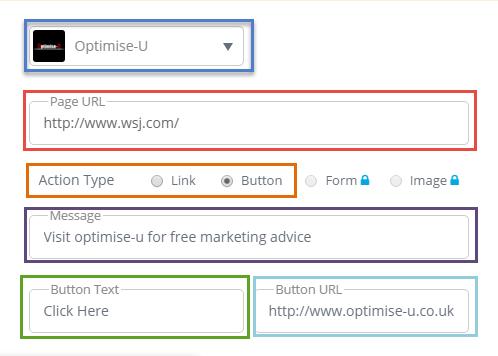
Here we have:
- The image and name you want to appear on your popup.
- The URL which you want to link to and share.
- Whether you want a link or a button (free mode).
- A call to action.
- Another call to action on the button.
- And the destination URL.
Which creates:
If you subscribe for a small monthly fee you have far more control over colouring and position of your popup. If you want to take centre stage you can place a full sized, brightly coloured popup in the middle of your destination link. I have to say I was very impressed with the customisation, even in the free mode.
The free version has a cap on the number of clicks you can get (1000) after that you need to pay $25/month. If you have read any of the rest of my work you should be able to make $25 from 1000 visitors.
Which leads me neatly into the pros and cons of Sniply.
The Snip.ly Review
Pros
- Snip.ly creates neat compact links perfect for social sharing.
- Snip.ly allows you to ignore the 80/20 guideline of social media.
- Excellent analytics allow you to monitor your campaign’s performance.
- Easy setup which takes less than a minute.
- It’s so different with the right call to action a 25% click through rate is easily obtainable.
- Lots of customisation options – even in the free version.
Cons
- Some people don’t trust indirect links – never really a problem on Twitter.
- Some people may find it intrusive.
- 1000 clicks per month are free, more and you have to subscribe to a cheap package.
The Verdict
Sniply is a great marketing tool. Nothing is perfect, but Sniply comes as close to perfection as any content sharing tool can.
The cons are barely cons when they are weighed against the advantages. It isn’t quite free but the packages are fairly priced.
As a result for this review I am giving Sniply a 9.5/10 rating.
So again if you want it all, get it all – sign up to snip.ly
If you need help working on conversions rather than traffic read my guide on user experience and social media.
Leave a Reply