I have written this guide looking at SEO in 2016 with the goal of being accessible to everybody. You may never have built a website before, you may have had one built for you. You may even be an SEO wizard.
My goal was to make this guide different - full of useful, actionable, powerful advice which is objective. Most importantly a lot of this information is unique - you won’t find these tactics elsewhere, and will be updated throughout 2016 to keep ahead of the trends.
This guide covers everything from history of SEO, to competitor analysis, keyword planning and overall strategy. It contains methods I use personally and has some truths about do it yourself SEO which the industry would prefer kept quiet.
Read on, I will give you modern SEO strategies which if you follow to the letter will mean you have no need for an SEO professional. You will be able to use a freelance web developer which is much cheaper - and do everything else yourself.
I have broken this ~8500 word blog into the following sections to make it easier for you to navigate.
Click here to expand the index for your navigational pleasure- Useful Resources for Modern SEO
- How does Google work?
- What is SEO
- The History and Future of SEO
- Find your Niche in 2016
- Build a Website to Conquer Modern Search Engines
- Complete SEO Strategy - Write a Google friendly page
- All About Technical SEO
- Webmaster Tools and Analytics
- Strategise your website’s architecture
- Make use of the header tags
- How to improve your page load speed
- Enable caching - more advanced page speed
- Make use of a content delivery network
- Plan your ERROR 404 pages
- Create a sitemap
- Nofollow bad links
- Include Robots.txt in your directory
- How to be mobile friendly
- Does link building have a place in 2016’s SEO strategy?
- Why is Social Media so Important for SEO?
- What is structured data?
- Conclusion
I have a belief in the saying - “if you can’t explain it simply you don’t understand it well enough”. SEO can be confusing so I have a glossary of terms that I refer to throughout. If there are any terms you want added just leave a comment. Likewise if there is anything you need help with just ask.
You may want to build a website to be number #1 on Google but don’t know where to start - I wrote the first few sections to give you a solid idea of how search engines work, what optimisation is and how to build a website to rank in 2016. Follow this guide and you will have an SEO friendly website.
If you are an experienced SEO I would recommend skimming the first few sections because I have put a scattering of good tactics in here which can be utilised by everybody from beginner to master. Throughout I have italicised sections which contain more complex strategy. These sections may not be useful for beginners.
Useful Resources for Modern SEO
I have added a list of resources which I personally find useful for working on SEO in 2016. There are lots of useful SEO tools out there. if you can think of anything really helpful to add, leave a comment and I will update this section and credit you.
I mainly want this section filled with practical tools which are useful to everybody, rather than niche tools which might come in handy one day. They don’t have to be SEO related, if you have a great general marketing tool drop me a comment.
It is good to follow both Google and Bing’s webmaster blogs. They often give advanced warnings of algorithm changes and often (slightly cryptic) SEO tips. Google also has an official YouTube channel, if you really want to get into advanced SEO watch Google’s official videos - there are hundreds of them.
- Official Bing Webmaster Blog
- Official Google Webmaster Blog
- Official Google YouTube Channel
- Official Google Pagespeed Insights
- Pingdom - unofficial but excellent page speed test - Click here to find out how to use it.
- Search Metrics - Case study on Ranking factors
- SEMRush Competitor Analysis - has it’s whole own section later on
How Does Google Work Today?
Google is a search engine - that we will all know. Globally 62.3% of all searches are made using Google as the engine - before Bing and Yahoo made a partnership more that 90% of us used Google as our search engine of choice. Google currently has an 88% market share in the UK where the majority of my readers are from.
[First written in 2015 these statistics will be updated later, for 2016 as and when they are available]
Google is the doorway to the internet and 40,000 searches are made per second. That is 3.5bn (yes billion) searches a day.
Google crawls the web with ‘bots‘. Google’s long term game plan is collecting all the information on the web in a knowledge graph so that when you have a question Google will have the answer. They aren’t quite there yet but who knows what the next five years will bring.
Google are notoriously secretive about the algorithm(s?) they use to index websites to bring back the SERPS(search engine results page) which you see.
Some things are known:
- Google collects information on individual users. They are starting to use this and your location to give more personalised search results.
- If you are signed into Google+ they know how old you are. The more information you give them through your profile, the more they tailor their results to you. Your interests, your friends interest and groups you are members of etc. They have access to all this information and you can see it yourself on your Google Analytics.
- Now and then Google test new sites, and new pages on existing sites by ranking them highly for one or two searches to see how people interact with the page. If you have webmaster tools installed you can see this happening.
According to the knowledge graph: “Google now uses at least 200 ranking factors” in positioning pages in their results. Some of these are known factors while others are hypothetical at best.
What is SEO?
SEO stands for “search engine optimisation”. To optimise. To make your website the best and most authoritative with the fastest loading pages. You want to give your users the best information and services that they can reach in the quickest, most convenient way.
While Google’s algorithm is a secret, Search Metrics have a long running study which is an excellent reference on what factors Google consider important when making a website. They crawl the internet looking at what common factors make pages rank, and with enough data it gives us a good idea of what some of the strongest ranking factors are.
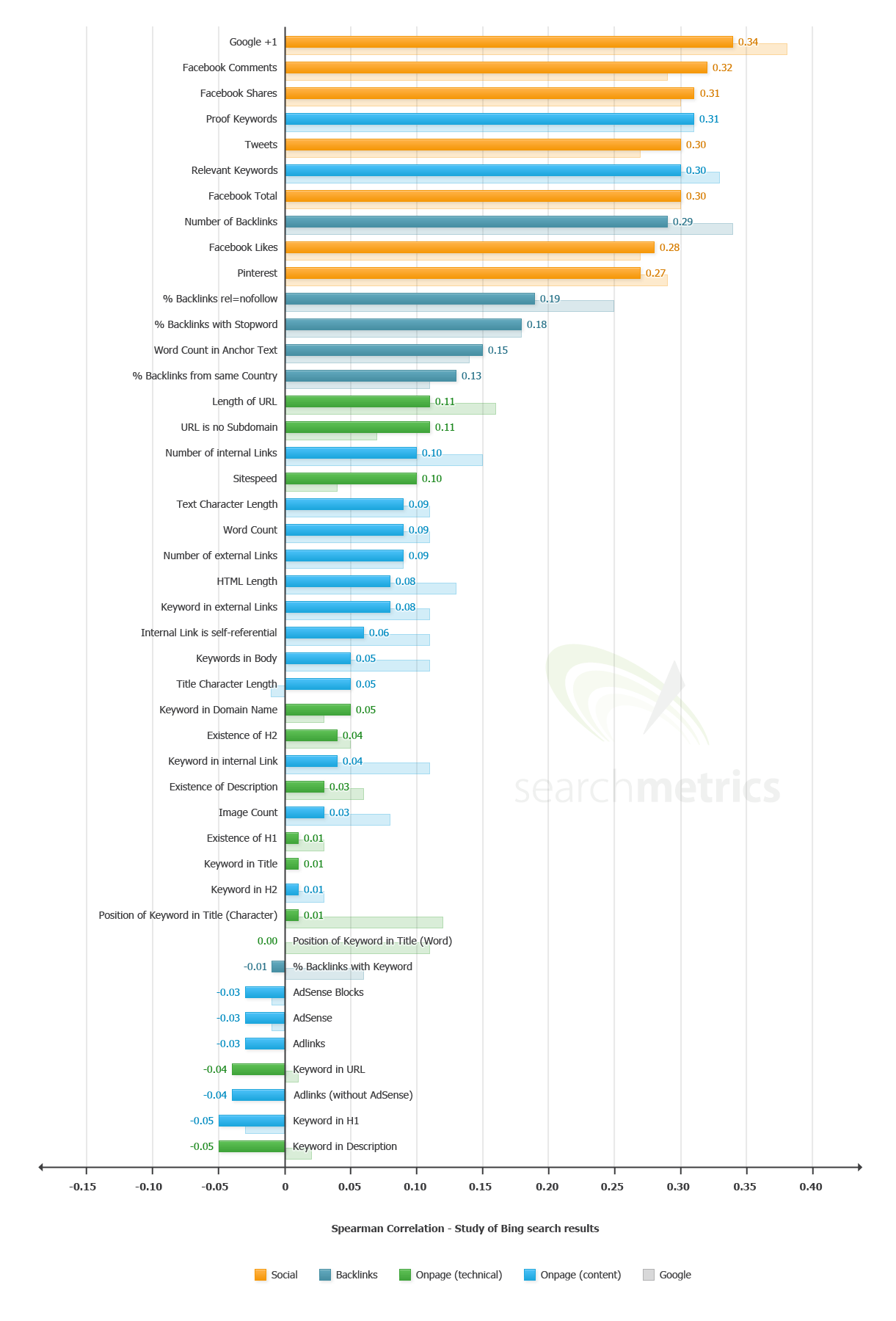
Search Metrics did a similar study on Bing in 2013. This data is old, but it compares Google and Bing using the same ranking factors. Search Metrics show that at least in 2013 if you optimised your website for Google - which is what most SEO is focused on - you were also more likely to rank on Bing.
Which search engine should I optimise for?
A lot of SEO is Google focused because they have so much higher search traffic than any other engine. The real answer to the question of which search engine to focus on is none of them, focus on the user.
As stated earlier optimisation means being the best. Make your website as well as you can, give your users the best experience and you will have the best chance of ranking not just on Google but also on Bing and Yahoo. If you optimise your website for a search engine, rather than your users you will find the rapid change in search ranking factors will damage your site.
Google and Bing have been playing cat and mouse with each other. Bing was made in Google’s image. To compete Bing couldn’t just return the same SERP as Google and expect to make a dent in Google’s market share.
The main known difference between Bing and Google is that Bing ranks big brands higher than small businesses. This is a factor you can only leverage by giving users a great experience over a long period of time. What the graphics show is that if anything Bing disliked keyword stuffing of all kinds more than Google did in 2013. Maybe it is Google now remodelling themselves in Bing’s image.
Ranking factors
According to Search Metrics study on Google Click through rate(CTR) is by far the strongest ranking signal. This can be manipulated with your title and description meta tags. It is however best to keep your title and description as accurate as possible so that people don’t bounce straight off your website.
We look at relevant terms under the next few main headings - the second ‘strongest ranking factor’ according to Search Metrics. Google’s goal is to index the whole internet by relevance, so in their ideology relevant terms should be the strongest ranking signal.
The third strongest signal, according to Search Metrics, is Google+1s - the Google equivalent of a Facebook like - which is a ranking factor you have a lot of control over. We will look at that in ‘why social media is so important for SEO‘.
About Search Metrics
This italicised section is not for beginners, if you understand great, if not skim on
The Search Metrics data is a year old and from Google.com - so American. Google’s algorithm is rapidly updating and Search Metrics can only look at websites that are ranking and make comparisons.
Looking at existing websites and comparing ranking factors is the best that anybody can do, but Google can and likely do compound ranking factors - and we can’t overlook the high likelihood that there is a ranking factor or two we have no idea exists.
Search Metrics’ graph is an excellent tool but we have to take it with a pinch of salt. Moz have a similar survey which finds different results - as they both have the same flaw they both show different results. Because they are only able to look at existing ranking websites they are deriving cause from correlation which is an inadequate scientific method.
Inside the algorithm
If I have a high click through rate but also a very high bounce rate do I still reap the rewards? Bounce rate is a very contested ranking factor because if somebody reaches your page and clicks straight off have they instantly found what they are looking for, or do they find your site irrelevant to the search they made.
A better example may be that according to Search Metrics +1s are a stronger ranking factor than link building. Their research may have found a correlation and been led astray.
Not all links are equal. The source of a link now matters. If a spam site links to you, you need to tell Google to ignore that link. If Search Metrics don’t take into account where the links are coming from and just go on the volume of inbound links - getting a +1 is always good, while some links are bad.
Search Metrics do take the source of the link into account. Some questions just can’t be answered definitively without Google explaining exactly how factors in their algorithm work with (or against) each other. Through extensive testing we are getting closer to objectivity.
The History and Future of SEO
In 2016 many SEO techniques have come and gone, I have a couple of full length blogs detailing the history and future of SEO. Read into them if you have the time, if not read on for a shorter summary.
- What’s so wrong with guest blogging Matt? - More history of SEO.
- Convenience is king - A look at the present and the near future.
The important thing to understand about SEO is that Google is all for optimisation. Their algorithm is a hugely valuable and well kept secret but they want build the internet into a network where information can be accessed in the quickest and easiest way. This is the whole point in the creation of the knowledge graph.
Understandably they are also very careful about saying something is “good for SEO” because SEOs have a tenancy to jump on bandwagons and copy what others are doing. Due to some great individuals with lots of passion doing endless case studies, in 2016 we know a lot about how Google works.
Take guest blogging - somebody authoritative writes on your blog in order to get a backlink to their website. This gives the blog a well written article and the writer a backlink.
People realised this was a good way of getting authoritative links to their website, so started filling the internet with “thin” content and spam.
As a result of this Google has slowly moved away from using their “page rank” algorithm and moved on to a more social signals based system. Google+ is Google’s own social network so they are likely to place added weight on the signals which come from it.
Find your Niche in 2016
Starting out online you want to fill a niche. You will have no domain authority(DA) so if you spread your services too thin - eg building a clothing store - the internet will be saturated with competition and you will have no hope. We are currently experiencing an online gold rush, everybody want to be the next big thing.
You want to set up, for example a clothes store which sells bamboo clothes. This is a very good example. They are soft clothes with all sorts of - environmental and other - benefits you can blog about to promote an online EStore. There are also likely to be little competition but some product awareness which you can leverage.
The Google method
There are a few ways to gauge both competition and get ideas for keywords. Google has the keyword planner tool.
I make a search for “Organic bamboo socks” as you can see at the top.
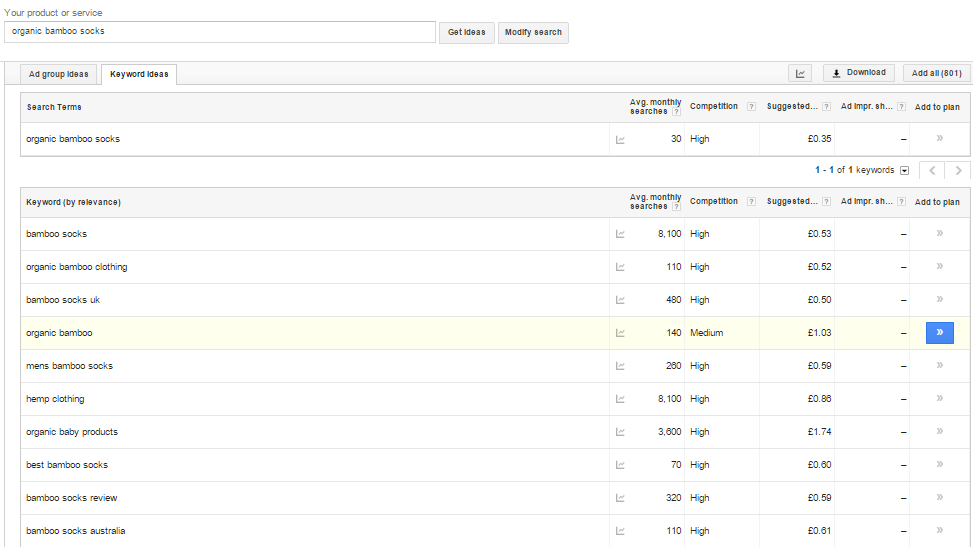
This is bad. Everything is high competition and many people have already jumped on the bamboo band wagon.
Google’s keyword tool is good but lets see what related terms people are searching for:

So let’s check “organic bamboo baby socks” in the keyword planner:
Unfortunately we have gone so niche that nobody is searching for this term. We need more ideas. Google is great for giving niche ideas. Lets try another tactic.
When you make a search at the bottom of the page Google gives you suggestions of searches related to your term - in this case “organic cotton bamboo socks“. These are usually lower competition terms which generate traffic.
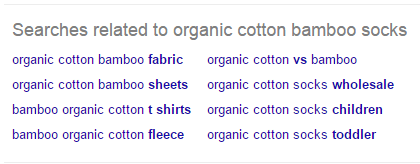
In an ideal world using the keyword planning tool and Google’s related search term we will find a niche with no competition but a high search volume. In 2016 this is highly unlikely to happen. This is where SEMrush comes in.
The SEMRush Method
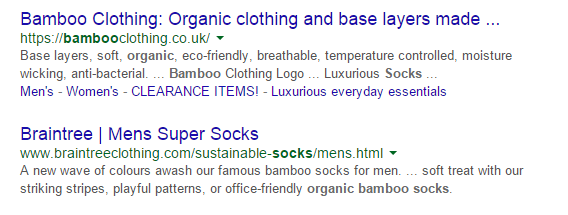
These are the search results for “organic cotton bamboo socks“. The first result will be hard competition to beat. They are a well established website which we will look at later. No worries, we can look at where they get their traffic from using SEMRush.
SEMRush is a competitor analysis program which is very effective at giving clear data of where your competition is getting their visitors from - and it’s completely free to use 3 times a day subject to certain limitations:
The website is very easy to use, free and SO USEFUL. Sign up and follow these steps.
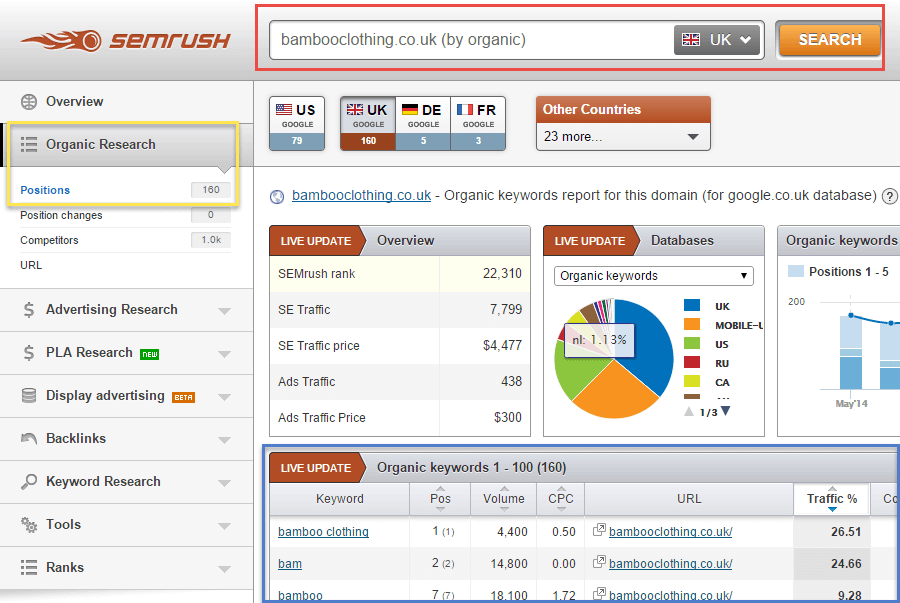
In the image above
- The Red Box is your competitor’s URL.
- The Blue Box shows you the organic keywords they are ranking for and what page they are reaching - you get 10 results in the free package.
- The Yellow Box is just the page you have to visit to reach all this coolness.
You can also look at their paid traffic under advertising research to get new ideas. If they are paying to rank for a keyword it is likely to be profitable if you can manage to rank for it yourself.
Get ideas for keywords through SEMRush and then run them through Google’s keyword planner to check the search volume. Then visit Google and check competition.
It will take a while but eventually you will get more and more long tail ideas until you find a phrase with high traffic volume but no competition - and this will become a main page on your site which you can write authoritatively about and out rank your competition.
If you are struggling to find the phrases you want to rank for, you can gauge your competition using an excellent auto SEO audit tool.
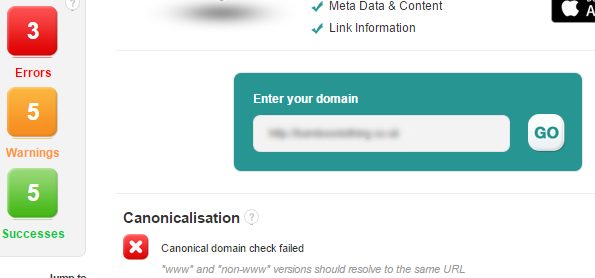
So there are a few errors with my main competition but it is a fairly established brand. Occupying a niche like this will take a long time but in the following sections I will teach you how to make a really nicely optimised site that will get no errors from any auto SEO audit tools.
Take time to find the right keywords. Google has so much traffic, if you find the perfect keyphrase you can easily build your site to rank for this phrase and get an extra few thousand visitors a month from the very start.
Build a Website to Conquer Modern Search Engines
This section is nice and short. I recently wrote a guide - there is an overused saying that “content is king”. Make the perfect website, the big search engines pick it up, you become a millionaire and never work again. In 2016 this is wishful thinking.
There is so much content on the web that allowing your users to reach their end goal as quickly, easily and happily as possible is the key to winning at modern SEO.
Happy users send those valuable social signals - Google+s, Facebook likes, Tweets - and build links. These are some of the most important ranking signals.
I cover this in full detail in my guide - convenience is king, we have too damn much content - but to summarise if you don’t have time.
- Make a website easy to use - do as much in one click as possible, that is where Amazon shines with their one click checkout.
- You want to allow social shares in one click, and if people need to login to a page on your website use social media to allow for one click logins.
- Run a blog or just a news page, you want to keep your site regularly updated with fresh content so Google regularly recrawls your site.
- Shop around to get the fastest web host. I find “A small orange” a good choice. Speed is a strong factor in Google ranking. A small orange has quick server response times and good customer service.
- Pick a great niche then follow the next section to the letter. Omit no step and you will have a high chance of ranking well.
Complete SEO Strategy - Write a Google friendly page
The way you write a page is massively important for SEO. I wrote this section to teach you how best to engage your reader and give a smaller business a chance to take on the big brands. Click the following links to quickly jump to the relevant section.
- Your title and description
- How to interrupt a skim reader
- How answering questions is the future of SEO
- Latent Semantic Indexing (Advanced SEO)
- Is simplification smart - the Readability guide
- Multimedia makes your page people friendly
- Bring down your bounce rate
- Always test your call to action (CTA)
I believe that you should write naturally and not for search engines. The techniques that I give here are as much to improve your user engagement as they are to improve your SEO. The two are completely interlinked and understanding that is the key.
I recommend using WordPress as your CMS if you are starting from scratch, it’s what I use and what nearly half the internet uses. You’ll want to make your pages as relevant to your niche as you can to get ranking. As we established earlier Google exists to index the internet by relevance.
I have included a whole raft of information. Most advice is both beginner and advanced depending on how much you test different ways of doing things. Follow any links for more information on particular subjects.
One subheading in this section is better ignored if you are just starting out and I have italicised it to make this guide as universally accessible as possible.
Your title and description:
Your page title is one of the best SEO tools. It is a strong ranking factor in it’s own right. It also has a strong effect on your click through rate which as we established earlier is likely to be the strongest single ranking factor. Try to include the phrase you are targeting early in the page title.
Have more than 40 but under 70 characters in your title - for instance this guide started life as “Startup SEO: Small Business SEO Strategy”. Overly keyword heavy - I only needed to use the term ‘SEO’ once.

The meta description is a weak ranking factor on Google - people debate whether it is a ranking factor at all - search metrics says barely. Like your title it has a strong effect on click through rate.
It is more important that you use your description to drive traffic to your website than to keyword stuff it. Your description sets you apart from others competing for the same phrase(s) that you are. You need your description to be accurate otherwise people will ignore you, or bounce from your page.
You want to include 150-155 characters in your description. 155 is the limit so don’t exceed this. Try different descriptions and see what works. The description can be changed at any time without penalty to your site. It is best to play about and see what works to bring you the most traffic.
All content management systems should allow for easy updates to a page description - if yours doesn’t, change it.
How to interrupt a skim reader
To rank on Google you want to write as much content on your niche subject as you possibly can. Long guides are impressive - people are more likely to share them or link to them. There may even be a direct SEO benefit to be had from writing a few thousand words.
People will often skim read these longer pages, specially if they are looking for a specific piece of information. If people skim read they won’t spend as long reading your page as they might otherwise. You can - and should - highlight important information to people in several ways.
Bold text improves both readability and engageability, grabbing the reader’s attention as they skim on past.

Quotes and image captions are great tools so use them, but be careful of over using them. There is a theory that bolding keywords makes them stand out to Google, whether this myth is true or not if you use bolded text too much you may as well not use it at all as the user will ignore it.
For the same reasons try to avoid flashy annoying popups, they may make you a small amount of money but users hate them.
How answering questions is the future of SEO
Voice search is the future. A study Google performed last year showed that 55% of teens use voice search daily.
People are increasingly asking their phones questions in the first person. This means that your main headings should be questions and your text should answer these long tail questions in the first person. It’s so simple but large corporations often overlook first person as it is seen as less professional.
Undeniably with the rise of voice search first person writing has advantages above and beyond creating a more personal relationship with your reader.
Now this is where it gets really complicated as the next section almost directly contradicts this one.
Latent Semantic Indexing (Advanced SEO)
Latent semantic indexing sounds very complex. When Google moved away from looking at keyword density to find the topic of a page they needed another system.
LSI allows Google to strip down a page into the keywords it uses and understand what the theme of the webpage is about. So it is very important for SEO.
From the above paragraph Google could probably tell this is at least in part a blog on SEO. LSI is why it is now pointless to repeat keywords - your keyword density now doesn’t really matter, what does matter is the way that you write.
The more non keywords you use the more that Google’s algorithm strips away, but also the more chance Google has of thinking something unrelated will be related.
This blog is a perfect example of this. My use of “organic bamboo clothing” earlier could confuse the system and take the relevance away from the focus of this guide being a complete SEO strategy - as they are completely unrelated keywords.
Matt Cutts explained back in 2013 that understanding the underlying meaning of search terms Google’s goal. Now it is 2016 they have largely achieved understanding, so stick to one topic per page but use as many related terms as you can
I have spent the best part of a year researching how Google is gaining understanding. If you are interested please read my findings.
Is simplification smart - the Readability guide
The traditional view is Google likes short sentences because it improves readability. I did a massive study proving this incorrect - identify what reading level your audience is looking for and write for them.
Don’t write for any robot telling you that they will improve your SEO - if your users don’t like your writing style you won’t have an audience for long. This is why the previous section isn’t so important.
Splitting your page into short sections improves user engagement and as a result SEO, so keep paragraphs short and use headings and sub headings. At the same time if a long paragraph feels natural, go for it.
The question is does Google prefer easy readability? Is the algorithm is advanced enough to tell what level of readability a user will want? or does Google just measure readability and do nothing with it?
I believe that engageability is all that matters for SEO - if your users like your page eventually it will rank. This means the fact only Google knows the answers to these questions doesn’t matter so much.
Multimedia makes your page people friendly
This is more to do with generally making your page user friendly then anything else. Some people like text, some people like audio and some people like videos.
Try to include at least a few images and maybe a video. Google own Youtube but that doesn’t mean you should put a different video on every page of your site just for the sake of it.
Google can measure if your user watches a video or how much of a video your user has watched and may use this as a ranking factor. Also don’t add cool animations just for the sake of it. This will slow your page load time and benefit nobody.
Include Alt tags on your images and write detailed descriptions when uploading videos as search engines are unable to read this content yet.
Bring down your bounce rate
Adding an index of on page links helps your search engine traffic find the information they are looking for. We have already established that people use search engines to find information. If for whatever reason they have difficulty finding that information they are likely to bounce from your page.
Simply by adding an Index to any long piece of content you write - and Google likes long content - you will find your bounce rate goes way down. This is a really simple, powerful SEO trick.
Always test your call to action (CTA)
Call to actions can have massive effects on keeping your users engaged. If you tell somebody to take an action they are more likely to do it.
This ranges from something like “grab this deal while it lasts” to “read on for more information” and everything between. If you want somebody to do something, tell them to.
Like your description you need to play about a lot with your call to actions. Titles, descriptions and call to actions can all be advanced depending on how much time you are willing to put into testing what really works best for you.
If you are struggling with call to actions just surf the web for a bit of inspiration - every good website uses more than one call to action.
All About Technical SEO
Follow the links to get taken to the relevant section. Most of these tips WILL improve your user experience and overall SEO. Some areas may be a bit difficult for a beginner to do alone - specially the sections relating to improving site speed and caching. If you run into difficulty, don’t worry.
- Webmaster Tools and Analytics
- Strategise your website’s architecture
- Make use of the header tags
- How to improve your page load speed
- Enable caching - more advanced page speed
- Make use of a content delivery network
- Plan your ERROR 404 pages
- Create a sitemap
- Nofollow bad links
- Include Robots.txt in your directory
- How to be mobile friendly
- Does link building have a place in 2015’s SEO strategy?
If you run into any difficulty
These techniques don’t require much programming experience. If you have made, or are building, the rest of your website you should be able to include all these suggestions in your website. If you haven’t made your own website, hop over to Fiver and employ a nice cheap web developer who is able to implement all the following suggestions for about $5 each.
If you are struggling in a few areas PeoplePerHour may suit you better, you can hire an hour of web development very cheaply from them. These techniques are quick to implement but have a powerful effect so you should never need more than an hour of professional help. I have no affiliation with either site, they are just an alternative to paying full fee for a professional.
If your website exists already and you are confident enough to play about with it - that’s great. Save backups and make lots of changes, see what works best for you. That is the true secret to SEO - play about and find the magic formula that gets you ranking #1. If you want any personalised help leave a comment. I will happily help.
Use Google and Bing webmaster tools - and Google Analytics
I cannot stress the importance of these tools enough - that’s why they come in first. Take Google Analytics for example. You can measure how people are using your site. What site did they come from? Which pages did they visit? How long for? But Google is the biggest data mining company in the world.
By installing Analytics you are allowing Google to test your website’s user engagement themselves, so obviously they approve of you giving them access to all this information.
If you have no experience with anything coding related installing Webmaster tools and Analytics can seem daunting. It may require real coding. You NEED all three of these tools installed, even if you have you pay $5 to get it done on fiver DO IT, it will be the best $5 you have ever spent.
This short video should give you an idea of what Google Webmaster Tools can be used for. Bing Webmaster Tools are similar but you should always have both. On top of all the other reasons, you need these tools in case there is a major error you have overlooked.
All three tools have different ways of installing. Check the links above for how to implement them. Most content management systems have an easy way of installing Analytics and Webmaster tools. WordPress uses plugins - so just put the name of the tool you want into the plugin search.
Strategise your website’s architecture
Search engines care about how you index your site so they can index it correctly themselves. On my website I deal with (among other things):
- Online marketing
- Search engine optimisation
- Social media
- Pay per click
The latter 3 categories are all different but linked by being under the umbrella term of “online marketing”. So the main theme of my website is online marketing, but I have categories - SEO, Social Media and PPC - each with various articles on different themes within these categories in my blog.
Search engines like clear indexing. When you plan your site, don’t jumble all your work up into a mess, create a nice organised interlinked website.
Make use of the <H> tag
H tags show search engines what content on your page are headings in order of importance. H1 is your main page title and should only be used once. Although Google allows for multiple H tags in some circumstances Bing in particular doesn’t like this practice.
H2 should be important headings on the page – like ‘All About Technical SEO’ for this portion of text. H3 are subheadings like “Make use of the <H> tag”. H4 less important sub headings and so on.
Have good page load times
Run your website though Google’s PageSpeed Insights. This will give you personalised advice on how to improve page load times. As it is Google’s product it is pretty safe to assume that if Google scores you highly, page speed isn’t something you need to worry about.
Google’s PageSpeed Insights will almost always tell you to minify your (HTML, CSS or Javascript). Unless you are a coding whizz I would let your caching (next section) minify for you as minification makes editing code harder.
If have a slow site it could be your server slowing you down or it could be an on page issue. Pingdom helps you tell what’s slowing you down by analysing the load speed of every aspect of your page. You can easily check if an image, font, plugin or script is taking unnecessarily long time to load. Pingdom helps you identify and fix these issues in a way the Google’s insights don’t.
Put your website’s URL in the test now box and measure the page load speed of every file on your website. If you select sort by load time in the red highlighted box you can see the slowest loading items on your page. They may be unnecessary files, or there may be a quicker work around you can use.
Enable caching
Caching means that your server saves copies of web pages for later use to speed your users page load time. If you use wordpress there are plenty of plugin options to enable caching. I use WP Fastest Cache, it is easy to use and saves a optimised copy of your page code to load faster.
Because there are so many different content management systems I will keep this short. Google likes caching, users like caching so it is worth enabling. Google search “[content management system you use] enable caching” and follow the instructions
Make use of a content delivery network
Content delivery networks save cached versions of your website in multiple worldwide servers meaning that users get a quicker connection to your website by connecting to the closest server. This is will help with your SEO and pagespeed - specially if you have lots of content.
Try out KeyCDN with $5 free credit to see the difference it makes. As covered earlier page speed is not just a ranking factor, it also hugely impacts on the user experience. Slow loading pages have high bounce rates, while slow loading websites have generally less page engagement.
Plan 404 Pages
Reaching a missing page is like hitting a brick wall. It ends the user experience and often they will leave your website.
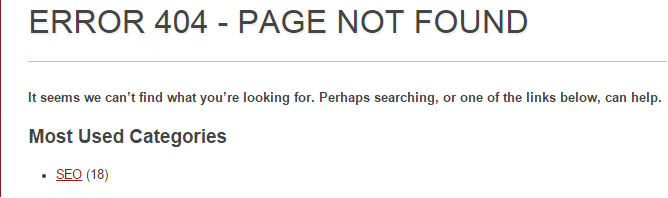
If you are running a blog and have a few popular articles make your “ERROR 404 MISSING CONTENT” page direct your users to a potentially useful post or page on your site. If you sell products make a clear link to a popular product category, you may prevent a bounce and even make a sale.
Again lots of content management systems allow you to customise 404 pages, if you use WordPress you can download plugins to easily build your own 404 page.
Create a sitemap
Sitemaps list every page which you want search engines to crawl and allow you to set the frequency which search engine spiders visit your site.
You can use a .xml sitemap creator to make a sitemap for you, then just add it to your root folder. Submitting your sitemap to webmaster tools is a good way of getting new pages indexed quickly. Many content management systems allow easy installation of sitemaps through plugins.
NoFollow bad links
A normal hyperlink reads:
<a href=”link”>Anchor Text</a>
Basic HTML there. If your link is to an advert, or is to a bad source Google might see as spam you want to change the HTML to read:
<a href=”link” target=”_blank” rel=”nofollow”>Anchor Text</a>
This prevents Googlebot from following the link on your site. It is good programming practice. If you are unsure if you should nofollow a link check Google’s Webmaster Guidelines.
When you build a link - to Google you are saying - “I think this is a good site so I am citing it for whatever reason”. Nofollow means Google understand this may not be such a reliable site to be linking to.
You should always plan where you are linking to. If your destination is a potentially spammy external site you probably also want to open the link in a new window so your user keeps reading your page. This is what ‘”target=”_blank”‘ does in HTML.
Have robots.txt in your directory
You can tell search engines which pages you want crawled with robots.txt. It is important to include robots.txt in your root folder even if you want your whole site crawled. This works in a similar way to nofollowing links - except you are doing it on your own website to tell Google not to index part of your site.
You want to use robots.txt regardless of whether it is a blank file. Follow the link in the subheading for a full guide from Google on using robots.txt.
Be Mobile Friendly
2015 is the year of mobile search. Google have just started rolling out updates to their algorithm which favour having a responsive website.
27.04.2015: We have some is some increased movement in rankings across both desktop, and mobile search. ‘Mobilegeddon’ has been going for about a week Google is likely still testing their algorithmic changes. Some large websites have found large drops in rankings.
If you use wordpress and you have a theme that doesn’t work well with smart phones; enable the “Jetpack” plugin which comes with the WordPress package. Inside, a feature allows you to enable a separate version of your website that is optimised for smart phone use.
If you don’t use wordpress ensure you’re using a CMS which is responsive (works on phones, tablets and all other devices). If you aren’t able to make your site responsive I strongly suggest getting a redesign from the lovely people at people per hour.
You can check if your site is mobile friendly with the “Fetch as Google tool“- which lets you see your page as Googlebot does. There’s a full guide if you follow the link in quotations.

Link building in 2016
Link building is another SEO tactic which has been abused. Pagerank was revolutionary and changed how we searched the internet by using inbound links as citations for how reliable a piece of work was likely to be.
People started link spam and using other black hat tactics so nowadays Google has been moving away from pagerank. I think with the right social media activity you don’t really need to build links - with great content and the right distribution people will build links to you.
Focus on getting featured on other blogs and news sites either through interviews about an idea or through guest posting on other people’s blogs. Just don’t mindlessly build links - good keyword planning is the key to SEO traffic and a great product, service or writing style will shine through all the clutter on the internet.
One good link from a high page rank site is worth so much more than a low quality (irrelevant) link - that is why the next section is so important. Networking is by far the easiest legitimate way of building high quality links.
Why is Social Media so Important for Modern SEO?
All businesses should be active and helpful on social media. It is one of the key philosophies of Optimise-U. If you help others and they like you they will follow you online. They will read and share your work. They will give you +1s on Google - Searchmetrics’ 3rd stongest ranking factor - and social shares etc.
These people will never engage with you if you don’t engage with them and often it is you who has to take the first step. Lots of people add friends en mass but that just doesn’t create the sort of social media community you want. You want people to share and retweet your work. Social media are viral platforms.
Never be afraid to reach out to a colleague and say “Hi”. It is often the first step towards great things happening. Build a great relationship with your audience, colleagues and friends. Also don’t be afraid to post cool art and funny jokes - life isn’t all about work and you want friends more than followers.
Do social signals directly help with SEO? Or are they just an after effect of creating great content which lots of people see and link to, then share? It is hard to say - social networking is one of the best ways of natural link building. Social networks are also great ways of generating traffic in their own right.
Again this is a subject I have written a lot about so I’ll quote myself and leave you with some sources to read if you have time.
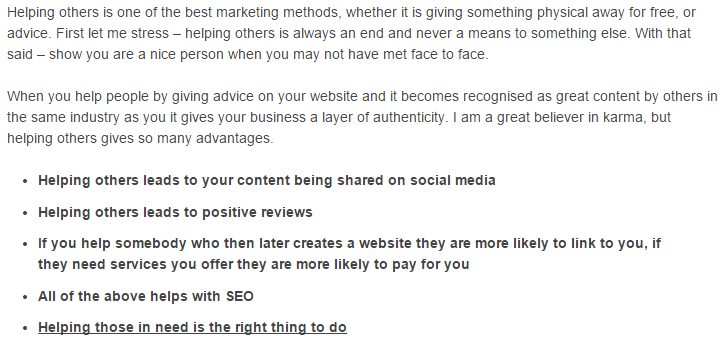
Going further than this - if I help you for free over social media, do a good job and you get a large piece of SEO work you need doing, you won’t shop around. I will be you first point of call.
So undeniably social media and helping others does help SEO, traffic and all that goodness. Just don’t use people, be genuine and let your personality market itself. Click the image above or the link to read the full guide - it is more social media focused than this one.
I have a further 3000+ word guide on how to build your social media up and really benefit from it which is popular but not on the SEO topic. If you have time give it a read. If not do follow the link anyway because it will take you to one fairly short section very worth reading if you are just starting with social media.
Whether the benefits of SSM(social media marketing) on SEO are direct or indirect, having an active social community results in higher traffic levels to your website and the more time you spend on social networks the more traffic you gain.
What is Structured Data?
From here on the guide gets more advanced. I have done my best to make it understandable if you have a basic knowledge of HTML. If you don’t feel free to skip to the conclusion.
From Google:
“Structured data markup” is a standard way to annotate your content so machines can understand it. When your web pages include structured data markup, Google (and other search engines) can use that data to index your content better, present it more prominently in search results, and surface it in new experiences like voice answers, maps, and Google Now.
As established in previous sections, Google and Bing are both in competition with each other to give their users the easiest experience. Using Microdata and Microformats you can tell search engines what type of data you have on your webpage and let them respond accordingly. For example you can:
- Highlight music or film to be played in one click.
- Highlight recipes, reviews, articles or news to appear above the normal SERPs.
- Show your company logo and social media in Google’s knowledge graph.
Microdata allows for all sorts of further classification. If you are a blogger you can mark up the pages of your site so Google knows who the author is, when they are published etc. If you own a restaurant you can highlight what part of your website is your menu, what sort of cuisine you serve. Structured Data exists to help machines understand your website but it also allows for rich snippets which can improve click through rate.
Schema.org was set up by the three big search engines - Google, Bing and Yahoo - to list the current structured data markup options. Google also has an very good guide on the use of structured data if you already have a good understanding of HTML.
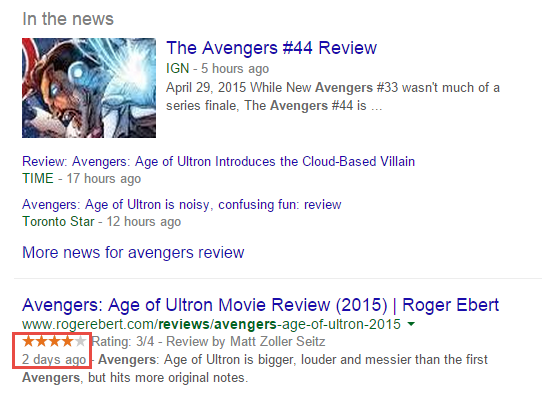
Google have claimed that structured data “has no direct effect on SEO”. This is a fairly cryptic message. Rich snippets are treated differently to regular listings - you can see this in the image above. The review above was written two days ago but is already ranked in at #1 after the news. You also won’t appear in the news listings without marking your website up with some basic structured data.
You might not be improving your organic SEO ranking by using structured data but some rich snippets do rank above organic listings. I would call that a direct effect on your search rankings if not your seo.
The structured data markup helper
If you have Google Webmaster tools, and a basic knowledge of HTML you can use the ‘Structured Data Markup Helper‘.
Give Google the URL of your page, select what type of data you want to mark up, then ‘start tagging’. When you have tagged everything you can on page Google outputs the Data to a HTML file which you can then upload to your server.
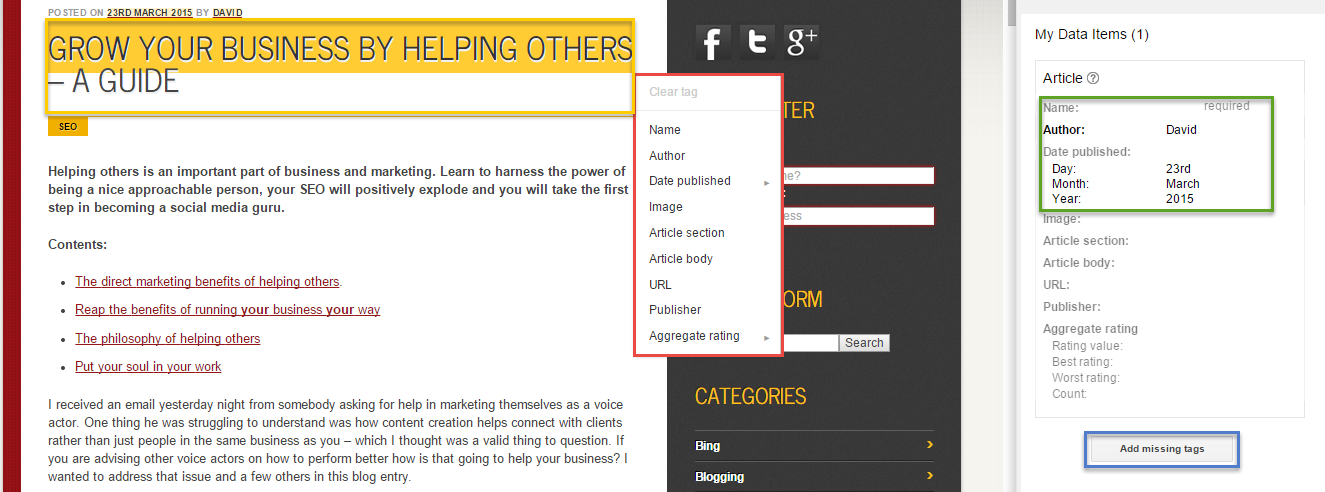
As an example I am tagging up one of my articles:
- The orange box is my article’s name.
- I tagged the article name in the red box.
- The green box shows what I have tagged and what I have left to tag.
- The blue box allows me to add missing tags - data I don’t want users to be able to see but which I still want marked up.
Google then outputs a new version of the page’s code for me to upload onto my server. This requires the ability to make changes to your pages code. If you aren’t fully able to change your page’s HTML, structured data generators now exist. You will still need to know how to make changes to your page’s HTML, but you can make these changes inside your CMS instead of having to upload a whole new page to your server.
Structured data for local SEO
Local SEO is a powerful way for small businesses to appear higher then the big brands. By signing up for Google and Bing places your business will appear on their map results.
The ranking factors for local SEO in 2016 are less clear than regular (organic) SEO. Local search results are dependant on where your user is and what device they are using. The physical position of the searcher is far and away the strongest factor in local SEO ranking. There are a few known tricks using structured data to improve your ranking in local search.
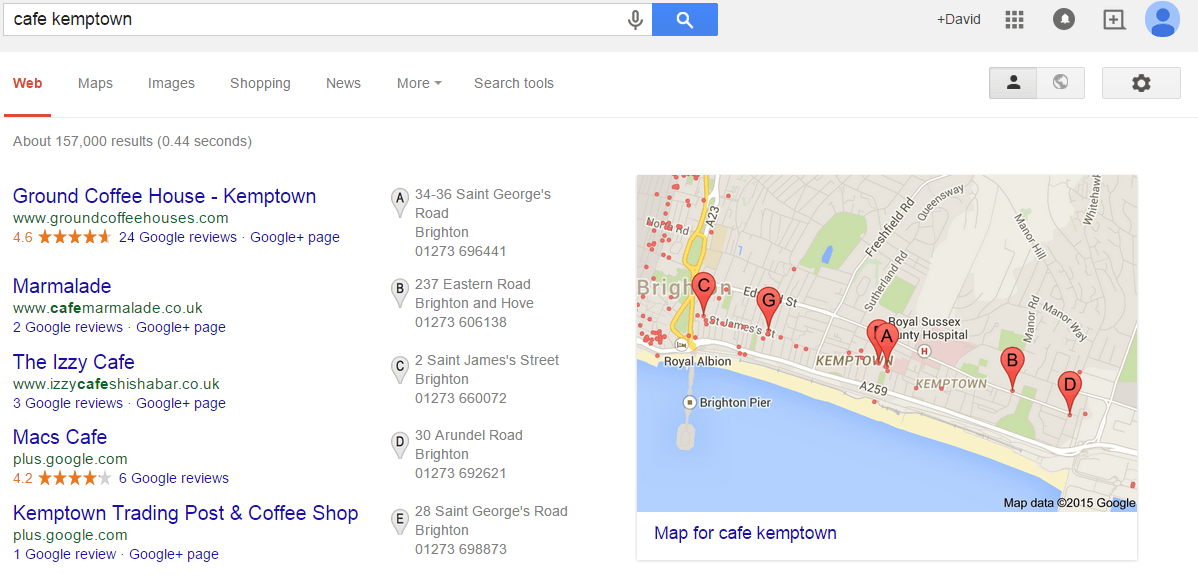
Using microdata you can mark up your business type. You want to input your details into this microdata generator and then put the code it returns into the footer of every page of your website. This validates the link between your business listing and your website - as well as defining to search engines what type of business you run. Although this isn’t required it is a recommended step to take if you want to appear on the maps above other local businesses.
It is really good SEO practice to have a calender on your homepage, or an events page, to show the events which your business has coming up. This will help search engines identify that you have a reliable, regularly updated website. Also it can help you appear on the knowledge graph, even if only temporarily, for any events you may be putting on.
By marking up your events page you are helping people find what they are looking for on your website in one click from Google - websites which have a calender of events shown on their homepage tend to have a higher click through rate. Even if your understanding of programming isn’t great you should be able to hire a web developer to get a calender built on your website to which you can then add events to yourself.
Other simple ways of improving local SEO is by getting your clients to leave you testimonials on trusted directories like yell.com and yelp.
Conclusion
I hope this guide has helped you understand what modern SEO is all about. I put a lot of work into getting this - and all the other interlinked - guide(s) written. This is a long guide congratulations if you read the whole thing and reached the end.
SEO is all about being the best solution to a potential problem that somebody has. If you take anything from this guide it would be that. Keyword planning is all about finding problems that people may have and solving them.
The technical side is all about making your site run as well as possible in the background, but it is writing the copy and distributing it through social media which is where your personality can really shine through.
In 2016 Google are able to organise the internet in the way they always wanted - you can’t cheat the system anymore. Don’t be a robot, don’t write for robots. Be yourself and let your work talk - when you put it like that advanced SEO becomes very simple.
Identify what makes you different and leverage it - I believe in honesty in marketing, which can be a dishonest industry. That is my niche - I have shown you for free how you can get a professional level of SEO and only pay for an hour or so of web development. If you need any further help whatsoever just leave a comment.
If you have any questions please leave a comment. A social share takes a second so please if you liked this guide, share it - your social engagements make it all worth publishing this free.
More on SEO:
Google ranking factors - How much do we know? - A more in depth look at SEO theory and what makes us rank
I really like your style and signed up for your email list. Keep long guides like this one coming
This is one of the best SEO guides I have read in a long time. Great job - you cover a lot of angles which most people ignore.
Thank you a bunch for sharing this with all of us you actually
understand what you’re talking about with the advanced SEO! Bookmarked.
Kindly additionally discuss with my site =).
We may have a link exchange agreement between us
Hey There. I discovered your weblog the use of msn. This is a very neatly written article.
I will be sure to bookmark it and come back to read extra
of your useful info. Thanks for the post. I will certainly comeback.
Hi Nellie, thanks for your comment. Please do come back if you are interested in SEO. My latest articles have moved further into SEO theory - what we know and what is just rumours. Please have a good look around.
Just wanted to say again, cheers for taking the time to write this. Not many people write such a complete guide that anybody can use! Should do a link building section
I like how you don’t focus on link building - way too many people seem to only care about the links that get built to their websites. I really like this ‘Strategy’ it is different
Thank you Adam, I have got lax updating this guide and the site in general. Expect some more, easy to action SEO tips and tricks.
In the mean time have you read my more basic SEO strategy template. Give it a read it’s the opposite of this sort of structured guide, but a very powerful and easy tool
Awesome post.
Great post. I was checking continuously this blog and I am impressed! Very useful information particularly the last part I care for such info much. I was looking for a complete SEO Guide like this for a very long time. Thank you and best of luck.
This is the perfect webpage for anybody who would
like to understand this topic. You understand a whole lot its
almost hard to argue with you (not that I actually would want to…HaHa).
You certainly put a brand new spin on a topic that has been written about for decades.
Wonderful stuff, just excellent!
Have to say this is one of the best SEO articles I’ve read on the internet. I believe embedding a video on your page helps your bounce rate because alot of people would rather watch a video than read 1,000 words of content.
Also agree social media networking is a great way to get natural earned backlinks.
Thanks Norman, if you liked that try reading http://www.optimise-u.co.uk/ux-engagement-seo/ it’s more focused keeping users engaged and reducing bounce rate.
The more mediums you can speak to people in the better they will engage. A picture speaks a thousand words, but some people learn more from reading. Audio, animation, slides, video and different formats of text all help engage your users.