Google didn’t just create Google+ to compete with Facebook as a social network. They also created it to make their search results more accurate and personalised. The posts you write can appear above your followers organic Google listings. If you aren’t using Google+, or if you aren’t taking advantage of Google plus’ circles your SEO is also missing out.
Search engine optimisation is an uncertain game. SEOs tend to be in disagreement about what works for exactly what reason. Most people in the know would agree however that Google create their products for a clear reason.
This reasoning is usually to either stay ahead of trends, or to make their advertising more accurate and as a result more valuable to their clients and more profitable for themselves.
Some SEOs for example would argue that using Google Analytics is a two way contract. In return for giving you the ability to see how your audience engages with your website, Google also gets the ability to measure these metrics.
Google have denied this in the past, but that is not to say that they don’t use other products such as chrome or android to measure these engagement metrics.
While SEOs generally advise using all social media platforms available, the direct and powerful effect that you can gain by writing posts aimed at specific circles of Google Plus followers is largely overlooked. Starting with an explanation of why the circle system makes G+ unique among social networks for marketing and promotion, this guide goes on to teach how you can leverage these circles to drive traffic where you want – with or without a website.
The great thing about Google+ is that it gives you a way of sharing your content with an audience without requiring a website. This post is particularly useful for musicians, artists and photographers who may not have their own website as well as bloggers and people looking to promote products.
Contents:
- How do Google+’s Circles Work?
- Get to the top of Google with G+
- How to build an engaging audience through G+
- Testing your circles engagement
- Conclusion
How do Google+’s Circles Work?
Social networks tend to allow you to either add your friends (Facebook style) or follow people (like twitter and Google+). The idea of adding friends is that you mutually agree you are friends. One party sends a friend request and only when the other party clicks accept you are able to see content which each other share – pretty simple.
The follower system is slightly different. You are subscribing to somebodies’ work who you may not know. You are saying you are interested in what they do and want to be notified of any thoughts or work they publish through the social network – again pretty simple.
Google+ has a unique follower system in the form of circles which seem to be created with promotion in mind. You could for example make a circle called “not interested”. In “not interested” you could put anybody who you want to follow you, but who’s work you don’t care to read. By segmenting your followers into circles like this you can decide who’s work you want to read and who you exclusively want to target with your own work.
This targeting is what makes Google+ so powerful and flexible. You can create circles of like minded people who you know are likely to respond well to a specific type of post. As you learn what makes your audience tick you can specialise these circles.
If you have one group of followers who regularly share videos, while another who seem to respond much better to text you can create a circle for sharing videos and a circle for sharing text. You can put the same users in both circles if you want. You can make a separate circle for people who regularly post high quality content that you can then reshare on to your own usergroup.
Google allows for more circles than you would ever need so the system is very effective. For example if I were both an artist and a musician I could keep all the people who like my music in one circle and all the people who like my art in another without creating two profiles. If I then decided to make a nutrition blog I could create a new circle and add users interested in nutrition. Every time I make a post on Google+ I can decide which circle(s) I want to see it.
Without having these users following me I can notify them (full guide on how to do this and how to identify the correct audience in the next few sections) to make them aware that I am blogging and if they are interested they will eventually become my followers. When they become my followers my posts will start appearing on their Google search results like regular websites.
Get to the top of Google with G+
When users are logged into their Google+ account, their SERPs are personalised. This means your posts are more likely to appear in your followers organic search listings if they key in a related term. If you are smart about how you target your audience and organise your circles you can bypass the organic search results and rank highly for competitive keywords – as seen in the picture below.
With the right keyword planning in your Google+ posts, and audience planning with Google plus circles – explained in detail later – you can funnel a lot of traffic to whatever destinations you desire. The link from Google takes users directly to your Google+ post. In this post you can include a link, add a video, image, event or poll.
You can even write long posts and use G+ almost like a blogging platform. If you are a musician you can then direct people to your Soundcloud, if you are an artist you can direct people to your Deviantart. Of course if you are a blogger you can send people to your blog.
The bigger following you have on Google+, the more traffic you can get through Google’s search if you leverage it the right way.
Why Google plus is the best social network for SEO
Google plus seems to be the perfect balance of Facebook, Twitter and LinkedIn. Facebook is the staple social network which everybody seems to use. Google’s usergroup seem more serious – or goal orientated. People use Google+ for a reason, and this reason is usually a clear way in which you can organise your followers into circles.
Google+ looked at what makes all the other social networks great and combined them. You can follow and interact with people easily without them following you back – a bit like twitter, but more so. You can post short essays, or guides on it in a similar way to LinkedIn. You can play about with textual characteristics, bold, underlined, italic, and it supports all varieties of multimedia.
Google is probably the largest data mining company in the world. With Google+ instead of trying to work out what people’s interests are from the websites which they visit as Google did in the past, people now freely give away their interests when they sign up or engage with other users. It could well be that Google plus was made with SEO in mind.
Some (correlation) studies have found G+’s social signals to be higher quality than other networks’. My last post explored this idea and found that there’s likely something in the view that using Google+ can have positive effects on SEO, quite a compelling reason to become active on the social network.
How to Build an Engaging Audience Through G+
To get the most benefit from Google plus you need to have a following who’s interests are similar to your own. You want an audience which engages with your content, an audience searching for the topics you post about.
The more users who reshare your posts the wider your content will circulate and the more traffic you will gain – both directly from G+ and also from the search engine.
To make the most out of Google plus you need to write posts which appeal to your followers, but also your follower’s followers. This means having a good idea of your audience’s interests and carefully writing your posts to be SEO friendly and relevant.
The power of Google plus circles explained
As explored earlier, one of the most powerful features which makes Google+ stand out from other networks is the ability to organise your followers into circles. You can then tailor the posts you make to appeal to each circle’s interests, and only send messages to groups of people they are relevant to.
For example I could make one circle for people exclusively interested in social media and one circle for people exclusively interested in SEO. If I was promoting this post to people with more interest in SEO I would say something along the lines of:
Google+ is one of the greatest tools you can use for your SEO strategy. Learn how you can improve your search traffic through Google plus.
That way if anybody following me in my SEO circle was searching for “SEO Strategy” or “improve search traffic” on Google, my post would be likely to rank highly.
Promoting this post to the group interested in social media I could post:
Are you making the most of social media marketing with Google+? Learn how to correctly use your circles to boost social engagement.
And this could get me ranking for “social media marketing”, “boost social engagement” etc. within this group.
With the right keyword research you can give blog posts a really strong visibility boost. This doesn’t seem to last for ever, but if your post is popular it gets a far better start in life than if you only posted it on Facebook. G+ is crawled very rapidly so you can find your traffic increasing within an hour of making a post.
Another great feature of Google+’s circle system is that you can send people in your circles notifications of posts which you have made. There’s a limit on how big you can make your circles while still sending notifications which is another good argument to keep your Google plus well organised.
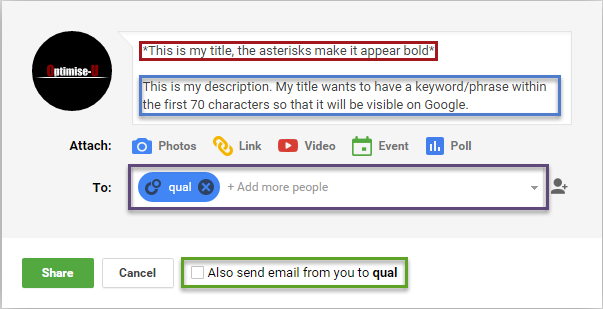
- Like a regular search result you want the main information, and keywords in your title to in the first 70 characters, or Google will cut the end off. The first paragraph of a post will make your meta title. Use asterisks (*) like quotation marks to bold your title.
- Google will create their own description snippet from anything which comes after the first paragraph of your post. If you want to be really SEO friendly make this second paragraph 155 characters long. The second paragraph will be your description in a two paragraph post.
- You can choose which groups you want to direct your post to in the purple box, including public (everybody), Use hashtags if you are looking for maximum exposure.
- If you’re sending your post to a small enough audience you can send a notification to everybody following you in these circles.
It is vital to get the right audience in your circles. If your posts are sent to a small usergroup you are less likely to start a discussion in the comments, so if you do have very organised and as a result smaller circles some posts can be best aimed at more than one circle. Like all marketing the more combinations you test the more effective your result will be.
Get the right audience for your circles – the influencer method
When you are starting out building your circles it is hard to gauge your audience’s interests. An easy way of building the “right” audience is to take a look at communities which are used by your target audience, or well known industry influencers.
Create a new circle – I will call this circle engagers from now on. Add to this circle anybody who interacts with your – and other relevant – posts in these communities.
People who regularly re-share your own work become the best following, but anybody who positively engages with what you, or other people post are worth adding. Scout out their profiles and make sure they are genuinely interested in the industry you work in rather than people who just share work to gain followers.
The more you engage with your audience and they engage back the more you will get to know what makes them tick. You can further tailor your circles to your audience as you find out who responds best to what. Some people really like to share videos and images, while others prefer to read a longer passage of text. Some people like to keep it simple.
As you’re tailoring your posts to these different people’s interests, add a scattering of relevant terms just like when you are writing a search engine friendly blog post. The better you know your audience the more you can classify them and write posts which they will appreciate and positively engage with. An ever increasing circle (excuse the pun).
Social engagement is a two way thing. It is easy to filter posts so that you can only see the engagers circle’s posts. If you +1, reshare and are generally friendly to these people they will start to follow you. Get an idea for the people who engage best with you – these are people you can cultivate a great relationship with, you never know what opportunities social networks will bring.
Testing your Circle’s Engagement
So now you have created a circle – and you think they engage well with you. They +1 and share your work, they leave comments and follow your links. But do they really read what you write, or are they just following an action for their own gain. Your circle of star engages may not be the close knit network you thought they were.
Social media has become a machine and it is hungry. We are told to make our daily post (at least one) and repost other users content that we like (as much as possible). Work like a robot and you will achieve social media success.
Recently I have been giving little engagement traps to the unsuspecting(I’ll only give one example) the information is good, but there isn’t much to it so people are likely to get bored. Sometimes I have been using images, please steal this idea:
This post will give your Google+ social engagement score
This is posted privately to (who I think my best Google+) engagers are. It is the third experiment of the type I have done. This time I want to do something practical which will help you all.It’s amazing (at least for me) how few people read the writing attached to Google+ posts when there’s an image attached. I tried without an image and still few of the people who +1ed actually read it
This time I am notifying people of this post to see what the engagement level will be, but I also wrote a much snappier headline with the promise of benefit to you
Knowing how much of your posts people read is important and also it helps you know who your best engagers are.
If you have read this to the end please comment with the word “done” then feel free to reshare/modify the message so you can test yourself have a snappy headline.
You can easily turn information into an engagement into a score
Divide the amount of comments of “done”, by any +1s and shares from other people who haven’t read your instruction and then times this number by 100 and you have your social engagers scoreHope people find this helpful – sorry to all who have read similar tests I have been doing
I sent this out to my circle of top engagers and got a very good response . Lots of people posted ‘done’ and nobody interacted without posting done. I was very please my top engagers did me proud (thank you one and all).
But I did this test with an animated piece of GIF art to all my circles and had horrible engagement. These are people I hadn’t built a relationship with yet and they all shared the cool image without reading the text, or writing the response I asked for.
Why should they after all, they don’t know me I am just posting a cool image to them. Why should they read what is attached?

I did a piece on the difference between a leader and a follower which is relevant here. You want to cultivate your circles. Make them engage as well as possible with you as you can. Give them little tests, and traps.
The question is what do you do with the ones who fail your test? Do you chuck them – expel them from your circle to one of lowly followers with poor engagement? NO
The beauty of these tests is that they give you an opportunity to build a relationship with your poor engagers. Drop them a message. Explain the test and how they failed. Start a conversation and great things will happen.
If you find that a lot of people fail engagement tests you set them (like the one above) work harder on getting the right content for your circles. You need to set the tone and keep it right, because everyone responds differently on social media.
That is the huge power Google+ has – you can partition your personality into different groups of people who will respond best to that side of you, then test and play around with these circles till you are getting the best possible engagement,
Conclusion
This post is designed as a follow up to my investigation into which social signals Google uses as part of their ranking algorithm. There are plenty of guides with lists on how to build a larger social following through Google+ but I prefer to give an actionable strategy that you can follow. The internet doesn’t need another generic “top 10 ways to gain a Google+ following”.
The goal of this blog was to open your eyes to how, if you think outside the box, Google+ can become a great tool to improve website traffic through Google (the search engine). My previous post did find that Google seem to favour signals from G+ over other search engines, so to go back to the point made in the introduction: if you don’t use Google+ your SEO efforts are missing out.
Watch this space I have the full case study described in the last section to write up. Also tomorrow I am publishing a long post which may well be my best – the link between user experience on social media and on site, and SEO
More on growing your social following:
Brilliant blog. I use Google plus and noticed people’s posts appearing in my search but I didn’t realise it was that easy to make them appear in Googles search results. How many circles do you use?
Thanks for your comment Karl. I have a lot more circles than I need, but I have my main circle for people who engage well with me who work in marketing related businesses, I try to engage back with them positively. Another circle for people who don’t engage with me so well who work in marketing and post interesting stuff. One circle for people I am targeting to get following me and a circle for general positive engangers who don’t work in marketing but do follow me and post interesting stuff. I also have a few more circles which I don’t really need.
Follow me on G+ or sign up to the mailing list if you want little tidbits of marketing advice :).
Wow. I can’t believe I didn’t think of using my circles like this. The way you explain it makes perfect sense, I always used Facebook and Twitter far more than Google+. I guess I have been doing it all wrong.
Hi Sue, have you read my analysis of which social signals Google uses in their algorithm? It might interest you - it seems to me that Google favour their own network. It’s the first link at the top of the article - I don’t want to post the same link 3 times on my guide:).
Kim says
Hello! This is kind of off topic but I need some advice from an established
blog. I want to setup in the social media niche - would you recommend that or am I to late to the party?
Kim
I would say you are late - but I would also say that from a bloggers point of view so am I. I am carving out my niche and finding some people very much like my point of view on social media and SEO. Maybe going more niche and just doing social media will work well for you :).
All the best
Dave
Hmm, nice post and tips. I have been trying to use gđ for few times now, but haven’t managed to see any special benefits comparing to FB. Will definitely follow your tips in the future. Regards, Matija, Slovenia
I like how you have written this. I came to the same conclusion as you, but I also followed your logic. You have me convinced at least, one of the best social media articles I have read. Time to share it.
Many Thanks Joel, Apologies I had a huge amount of spam to shift through to find your comment. All social shares are greatly appreciated and will be used in future case studies.
I need to appear on Google but don’t have a website - G+ would seem like the way to do it. Thanks - bookmarked!
Thanks for your comment Martin. Having a website can be great but you don’t need one, for marketing Google+ is my favorite social network.