When doing consultations over and over I see the same easy to fix on page seo mistakes. I just wanted to do a short article that can be used as a checklist if you make your own websites or to see if your web designer knows what he is talking about from an SEO perspective. Click the links below to jump to the different sections
- Pages must have titles and main headings.
- Pages must have unique accurate descriptions.
- Images must have descriptions and alt text.
- Links must also have titles.
- Your website must use an XML site map and have logical structure.
Fairly basic stuff here but seo mistakes are all to easy to make. If it is your first web project you may not know what you are doing is wrong. The guide also helps you identify if you’re using a web designer whether they are optimising your site.
A lot of people don’t program from scratch however most web design platforms do allow you to inset your own HTML, or will have methods of inserting important tags. Check your platform’s support pages for further information if that still won’t work Google is your friend. Read on to see how to avoid these mistakes.
The Page Title and Main Heading
The first SEO mistake is forgetting to have a page title. Page titles are strong ranking signals and Google uses them to give searchers an idea of what your page is about before they click onto your website. The above image is an example of how the title tag is coded with an example of what it does.
Depending on the website you should consider what keywords you want to put into your title while keeping it snappy. The page title has a strong effect on search-ability. I didn’t want to focus too hard on purely SEO so I went for ‘demystifying web marketing’ as a slogan. It is worth noting this blog targets some of the most competitive search terms on Google. I wanted to get my message across more than targeting the optimal keywords for SEO. Try and write a short title focused on one keyword.
If the top of the screen where it says ‘Optimise-u Demystifying Web Marketing is blank on your web page and you are using a platform like word press check in the settings. If you have a webmaster discuss good title tags with them that will suit your business.
As well as the main title all pages should have a main heading. You can identify the main heading to search engines by using the <H1 tag>. H1 stands for ‘Heading 1′ or main heading. You should only have one main heading per page. All other heading’s should be labeled with <H2> to show they are sub headings. The main heading on this page is:
The title of this article has been shortened to five rookie SEO mistakes. Short snappy keyword focused titles are good as your title is a very strong ranking factor.
Describing Your Pages
The second SEO mistake is forgetting to write a personal page description - or writing an inaccurate page description. A lot of web designers leave the description blank. Google is able to pull a description from your web pages looking something like this:
You can and should make your own for important pages. You know what you are trying to achieve - what your audience search for and where you want to appear, Google won’t necessarily. The description should be clean English like the example but as each page is different so should each description. Play around, it keeps your content fresh. Try and put a call to action in the description or really give people reason to visit your site. It is vital your description is accurate otherwise you risk really damaging your SEO.
If you are programming a website yourself you can add description tags below your title tag:
<meta name=“description” content=“Your description“>
If you are using a platform to build your website off then it varies on how you can add a meta description. Google search for example “[your platform] Meta Description” to find out how to do this best for your own website. I simply can’t cover every platform’s individual way of customising your meta description. For more information on the meta tag visit w3 schools website.
Describing Your Images
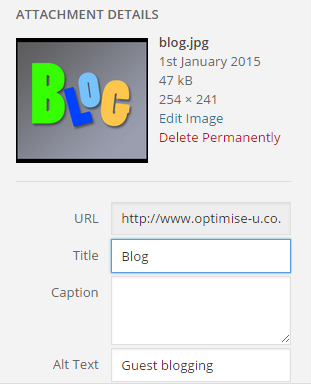
A lot of people don’t properly understand alt text and as a result make the third SEO mistake. Google may be able to read text but it can’t see images content. It is vital that you both describe your images by adding ALT Tags. Alt stands for alternate text. If for any reason your image doesn’t load the alt text is displayed instead.
The HTML code for alt tags if you are able to modify your website is:
<img src=”[your image’s URL]” alt = “[your image description]>”.
I would advise keeping this short and only focusing on one keyword for each image. At the same time it is important like the description to be accurate. It is more important that the alt tag serves its purpose and describes images when they don’t load, than being stuffed with keywords but not making sense.
Again discuss this with your web master or check how this is done on your individual platform as it does vary. Usually there will be a description box when you upload an image which is quite easy to find. I will use WordPress as an example because it is widely used:
Describing Your Links
Having messy hyperlinks is the fourth SEO mistake. This part is pretty simple. Use hyperlinks rather than posting the long address of a website. This allows you to put additional keywords into the link title which are relevant to the page you are linking to. Most web building platforms will allow you to input your own HTML, some make it easier to do than others and some have inbuilt different ways of doing this but from the back end of the website a hyperlink looks like this:
<a href=“[the web address]”>[hyperlink wording]</a>
Don’t simply write - click here. Instead try and include links as part of the body of the text you are writing. “Read our hyperlink SEO guide for more information” - is a good example
It is vital if you are posting an irrelevant link on your page to add what is called a no follow attribute. If I am writing a blog on SEO and link to a bakery which I have been working with the content of this website is nothing to do with my blog. Google will follow this link and consider my blog entry less relevant. To avoid this simply word your link like:
<a href=“[the web address]” rel=”nofollow”>[hyperlink wording]</a>
Benefits of an XML Sitemap For SEO
XML sitemaps are often considered quite tricky but they don’t have to be. Not having one is a major SEO mistake because without a sitemap you can’t access Google’s Webmaster Tools. These tools are so useful for advanced SEO that they require their own guide. (coming soon).
XML sitemaps link your website up by category neatly. They allow Google’s spiders to index every page of your website. Several websites generate you a free XML sitemap to insert into your site. Sitemaps look something like this:
Conclusion
These are just some mistakes I have seen which are particularly easy to fix. If you ensure your websites have none of these SEO mistakes you are off to a very good start. As a final tip I would advise installing Google Analytics onto your site so that you can work on your site’s engageability. If you managed to setup webmaster tools you will be able to set up Google Analytics, and the engageability guide is a good next step towards slightly more complicated SEO tactics. SEO can be very complicated, but making sure you aren’t making any mistakes is a very good start.
More: